Alo Yoga Puffer: Check Savings & Packaging Costs
Insight
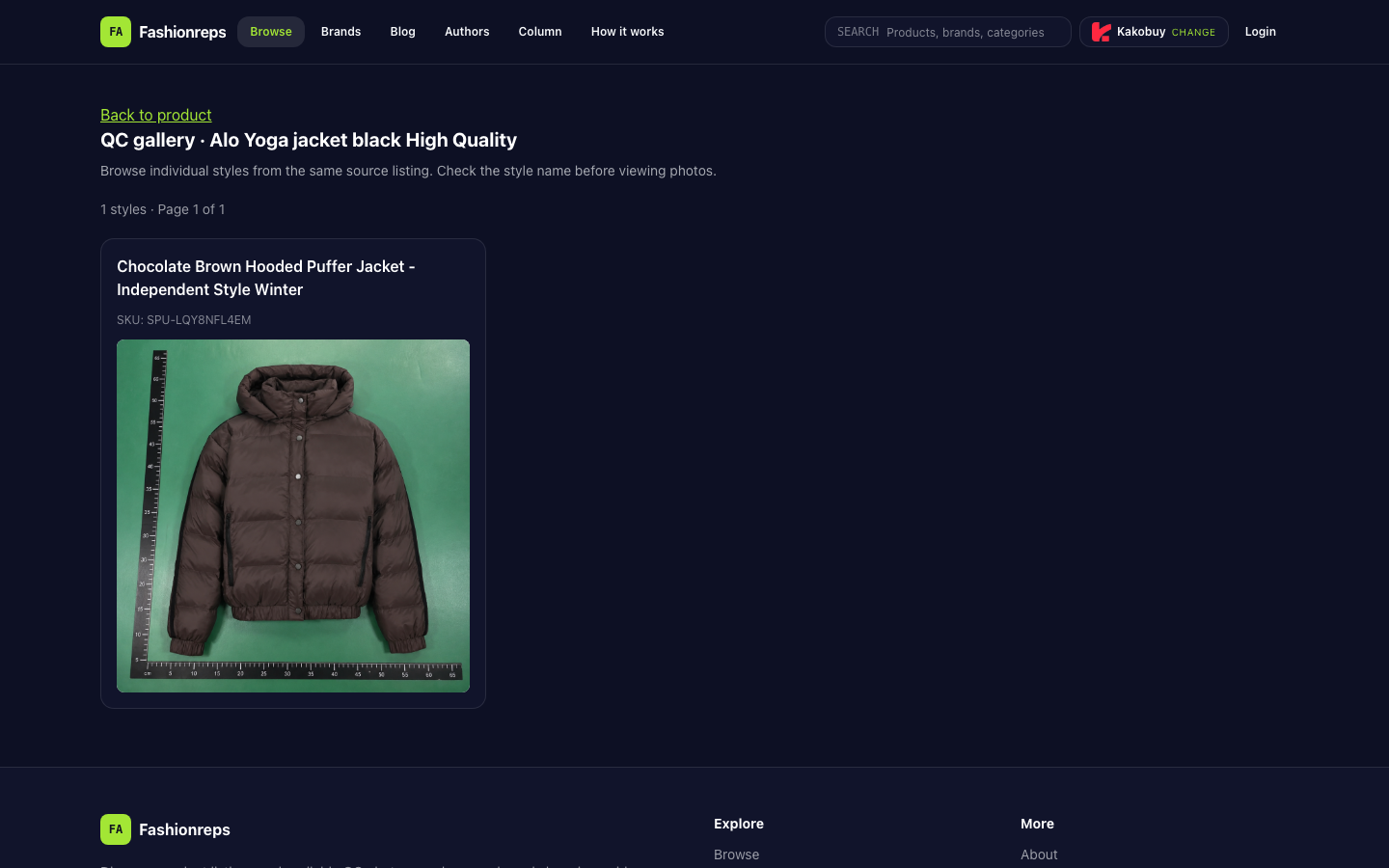
Jonas ReinhardtFirst confirm you're checking the same item Before comparing discounts or calculating the final payment amount, save the product page, color, size, style, query time, and current shopping platform. The page title shows "Alo Yoga jacket black High Quality," but the only style name listed is "Chocolate Brown Hooded Puffer Jacket - Independent Style Winter," which doesn't fully match the color and style description. Therefore, you can't just rely on the
Jonas Reinhardt is Editor-in-Chief of the Kakobuy Yupoo Review Desk, writing agent comparison tables and leading retests. The work covers shopping-agent operations, parcel forwarding and QC photo standards, with Jonas signing off every hands-on score. Reviews are checked for order dates, QC photo notes, warehouse measurements and shipping-line timings, connecting the comparison tables with the records behind their scores. Each month, two reviews are selected at random and audited against original photographs and receipts, making publication approval and recurring checks of the supporting material part of the editorial work.
First confirm you're checking the same item
Before comparing discounts or calculating the final payment amount, save the product page, color, size, style, query time, and current shopping platform. The page title shows "Alo Yoga jacket black High Quality," but the only style name listed is "Chocolate Brown Hooded Puffer Jacket - Independent Style Winter," which doesn't fully match the color and style description. Therefore, you can't just rely on the page title to treat it as a black Alo Yoga puffer jacket, nor confirm that a specific variant is available.
The page also indicates it's a QC image page and notes that you can browse styles from the same source item; this helps verify images and style names but can't replace the current shopping platform's inventory, price, or checkout information.

Record the item price, but don't use the page title as the checkout basis
After entering the actual shopping platform, first confirm whether the following fields all correspond:
- Product name or item number
- Color and size
- Style or variant name
- Unit price and quantity
- Whether there are different fabrics, fillings, or independent styles
- Stock status shown on the page
- Item amount after adding to cart
The QC page currently verified doesn't provide product price, inventory, coupon codes, or final payment amount for this article. Therefore, you can't fill in specific discounts or calculate how much you'd save. If the cart color shows black, but the only style on the QC page shows Chocolate Brown, pause comparing discounts and re-confirm whether you've opened the same item or variant.
Check discount conditions in order
Don't just look at promotional wording or the discount number shown on the checkout page. Record the discount name, applicable scope, and restrictions one by one:
- Confirm whether the discount applies to item amount, shipping fee, or the entire order.
- Check the minimum purchase threshold, and whether it's based on item subtotal or post-discount amount.
- See if specific brands, styles, colors, sizes, or independent items are excluded.
- Record validity period, applicable region, applicable account, and usage limits.
- Confirm whether it can be stacked with other discounts.
- Check in the checkout summary whether the discount actually takes effect, not just shown as a hint on the product page or cart.
If the page doesn't show complete conditions, don't assume that a "spend X get Y" offer necessarily applies to this jacket, or write unverified coupon codes into your budget. The discount amount should be based on the checkout summary before submitting payment.
Break down packaging and shipping separately
The final amount for cross-border orders usually isn't just the item price and discounts. When checking out this jacket, at least record separately:
- Item subtotal
- Confirmed discount reduction
- Order or agent service fee
- Packaging or reinforcement packaging fee
- Actual weight
- Chargeable weight
- Package volume or volumetric weight rules
- Destination country or region
- Optional shipping lines
- Line surcharges or insurance fees
- Exchange rate used at checkout
The current QC page only provides product page and image related information, with no data on service fees, packaging fees, actual weight, chargeable weight, destination, shipping lines, or exchange rates. Therefore, none of these items can be inferred from that page. In particular, don't fill in a weight or shipping fee just because the item looks like a puffer jacket; and don't treat product page discount hints as shipping fee reductions.
Use the checkout summary to verify the final amount
Before paying, you can review the amount in the following order, but each item should be replaced with the actual numbers shown on the checkout page:
Item subtotal − confirmed discounts
Then add service fees, packaging fees, shipping fees, and other clearly listed charges, and confirm the amount due according to the currency and exchange rate shown on the checkout platform.
The key isn't just looking at the discounted item price, but confirming whether the discount offsets additional fees. If the discount only reduces the item subtotal but increases packaging or shipping related expenses, the final amount due may not actually decrease. Without actual checkout data, you can only explain the verification method, not claim that a certain plan saves more.
Pause conditions when pages are inconsistent
In any of the following situations, pause payment and keep screenshots:
- Product title, color, and style name contradict each other.
- The style shown on the QC page differs from the cart variant.
- The discount is visible on the product page, but no reduction appears in the checkout summary.
- Service fees, packaging fees, or shipping fees appear on the checkout page without explanation of their calculation basis.
- Actual weight and chargeable weight differ, and the platform doesn't explain volumetric weight rules.
- Destination or shipping line selected incorrectly.
- Exchange rate causes the amount due to differ significantly from the cart estimate.
It's recommended to save screenshots of the product page, cart, discount conditions, package parameters, and final checkout summary in order, then confirm the discrepancies with the shopping platform customer service. Before customer service confirms, don't include discounts not shown in the checkout summary in your budget.
Conclusions from this verification
Based on available evidence, we can confirm: On Fashionreps, there exists a QC page with a title containing "Alo Yoga jacket black High Quality," but the only style listed on that page is "Chocolate Brown Hooded Puffer Jacket - Independent Style Winter." The current information is insufficient to confirm the black variant, available inventory, product price, discount applicability, packaging costs, or shipping fees.
Therefore, the safest approach right now is to first unify the product variant, then obtain discount conditions and package parameters from the actual shopping platform, and finally verify the total amount using the pre-payment checkout summary. Any specific savings amount, minimum cost, or available coupon codes should wait until these fields are actually confirmed on the page before making a judgment.