barcelona Jersey Coupon: Verify Variant Eligibility
Insight
Jonas ReinhardtThe Bottom Line Currently verifiable information only shows that the relevant pages include multiple Barcelona retro jersey styles, such as Classic, Casual, Travel, Daily, Streetwear, and other variants; existing evidence does not provide a confirmable current coupon code, discount amount, minimum spend, personalization exclusions, or validity period. Therefore, you cannot judge coupon eligibility solely based on the product name or "number and name printing" options, and you should not write
Jonas Reinhardt is Editor-in-Chief of the Kakobuy Yupoo Review Desk, writing agent comparison tables and leading retests. The work covers shopping-agent operations, parcel forwarding and QC photo standards, with Jonas signing off every hands-on score. Reviews are checked for order dates, QC photo notes, warehouse measurements and shipping-line timings, connecting the comparison tables with the records behind their scores. Each month, two reviews are selected at random and audited against original photographs and receipts, making publication approval and recurring checks of the supporting material part of the editorial work.
The Bottom Line
Currently verifiable information only shows that the relevant pages include multiple Barcelona retro jersey styles, such as Classic, Casual, Travel, Daily, Streetwear, and other variants; existing evidence does not provide a confirmable current coupon code, discount amount, minimum spend, personalization exclusions, or validity period. Therefore, you cannot judge coupon eligibility solely based on the product name or "number and name printing" options, and you should not write off a coupon as effective before seeing the reduction at checkout.
The correct approach is to first confirm the specific jersey variant, then record the coupon conditions, and finally rely on the actual amount at the checkout page. If the checkout page does not show a clear reduction, you should pause payment and keep screenshots.

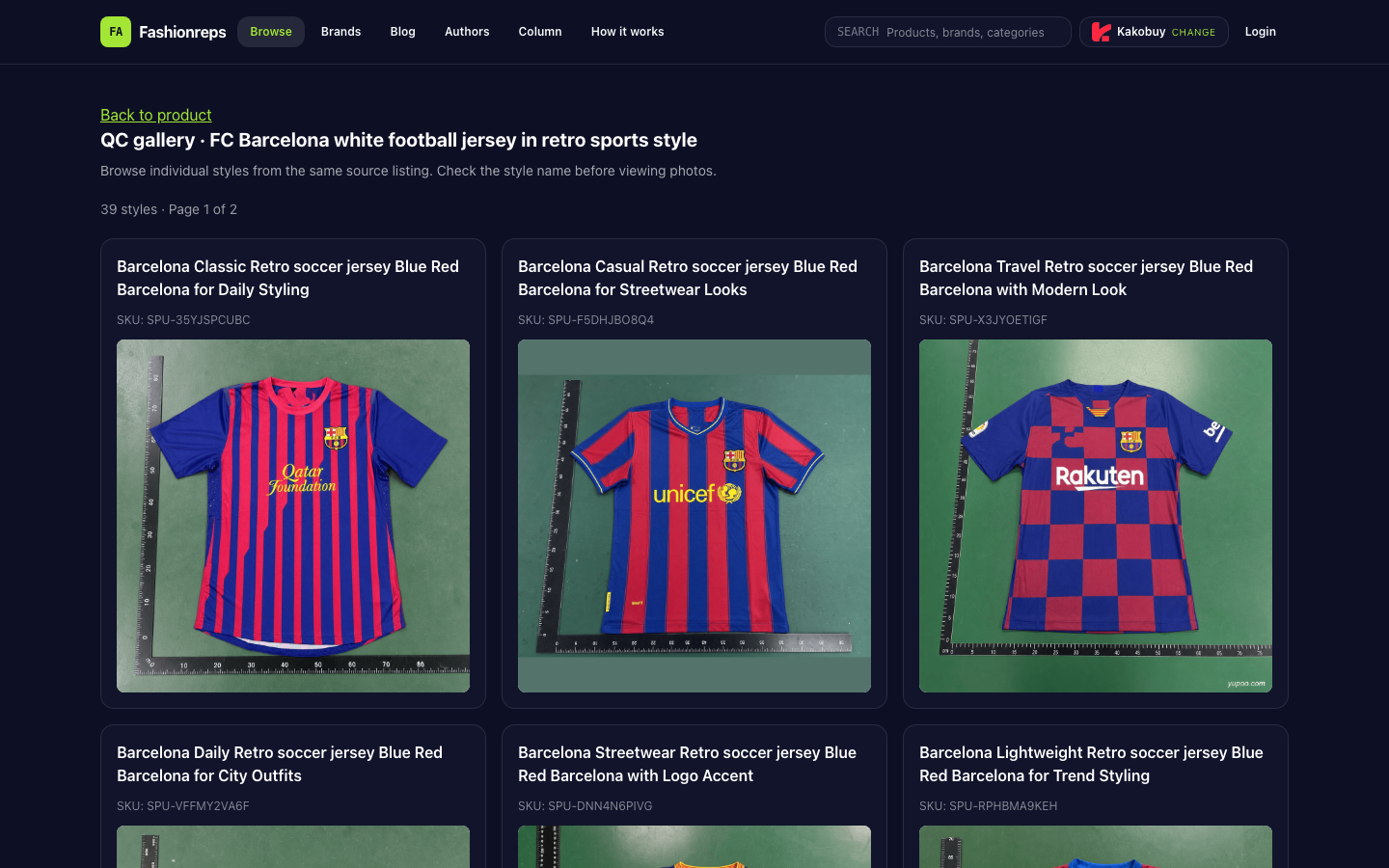
Image: Screenshot of the relevant product page, showing multiple Barcelona jersey styles from the same source.
Step 1: Lock Down the Specific Jersey Variant
Do not just write down "Barcelona jersey". Product information shows that under the same source there are several styles with similar names but not identical, including:
- Barcelona Classic Retro soccer jersey Blue Red Barcelona for Daily Styling
- Barcelona Casual Retro soccer jersey Blue Red Barcelona for Streetwear Looks
- Barcelona Travel Retro soccer jersey Blue Red Barcelona with Modern Look
- Barcelona Daily Retro soccer jersey Blue Red Barcelona for City Outfits
- Barcelona Streetwear Retro soccer jersey Blue Red Barcelona with Logo Accent
- Barcelona Lightweight Retro soccer jersey Blue Red Barcelona for Trend Styling
- Barcelona Resort Retro soccer jersey Blue Red Barcelona for Travel Looks
Before ordering, you should separately record the product name, color, size, and whether the page provides number or name printing options. If the personalization option is completed in another style, a note field, or a customization entry, also save the corresponding page state to avoid mistaking the basic version and the personalized version as the same product.
Step 2: Record Coupon Conditions Item by Item
Before claiming or using a coupon, first confirm whether the page clearly states the following:
- The specific applicable products or product categories
- Whether a minimum spend amount is required
- Whether customization, number, or name printing variants are excluded
- Whether colors, sizes, or specific styles are restricted
- The start and end time of the validity period
- Whether it can be used only once
- Whether it can be stacked with product discounts, store offers, or other promotions
- Whether the offer requires login, claiming, or use at a designated entry
If the page does not clearly explain any of these items, mark it as "not stated" and do not make assumptions on your own. For example, just because a regular jersey can use a coupon does not mean that adding number or name printing will still qualify; similarly, seeing a coupon entry does not mean that the coupon has been successfully claimed.
Step 3: Check Product Page, Cart, and Checkout Page
Product Page
First select the exact Barcelona style, color, and size, then confirm whether the number or name printing option changes the product name, price, or order note. Record the product amount displayed on the page and the status of the coupon entry.
If the product page does not show personalized pricing, customization restrictions, or coupon applicable scope, do not use information from other styles' pages to replace the current product's conditions.
Shopping Cart
After adding to cart, verify the product name, quantity, color, size, and personalization content. Focus on whether the coupon is accepted by the system, and whether the discount applies only to the base product amount.
In the cart, you should also separately record any possible service fees, packaging fees, or other charges. Do not assume that the final order has received an equivalent discount just because the product subtotal decreased.
Checkout Page
Before checkout, review the order summary and confirm whether the following amounts are listed separately:
- Product subtotal
- Product discount or coupon reduction
- Service fee or handling fee
- Packaging fee
- International shipping fee
- Exchange rate or converted amount
- Final payable amount
Only when the checkout page clearly shows the coupon name, reduction amount, or discounted subtotal, and the final payable amount has changed accordingly, can you confirm that the coupon is effective on the current order. If the coupon shows as unavailable, conditions not met, expired, or discount amount is zero, you should stop payment and check the specific reason.
Recommended Verification Records to Save
| Verification Location | Information to Save | Key Judgment |
|---|---|---|
| Product page | Style, color, size, number or name printing option, product amount | Whether it is the target variant, whether personalization restrictions appear |
| Shopping cart | Product details, coupon status, product subtotal and other fees | Whether the discount applies to the current product, not other products |
| Checkout page | Coupon name, reduction amount, shipping fee, service fee, final payable amount | Whether the discount is truly included in the order total |
Screenshot files should include date and time, and at least preserve the three types of pages: product page, cart, and checkout. If you change the number, name, size, or quantity, it is recommended to take new screenshots, as these changes may affect coupon eligibility or amount.
When to Pause Payment
If any of the following situations occur, do not consider the coupon as confirmed:
- The coupon only has a promotional entry, without showing applicable products or specific reductions
- After selecting number or name printing, the coupon status disappears or the amount recalculates
- The cart shows the discount, but the checkout page has no corresponding reduction
- The checkout page only shows the discount percentage, without showing the actual reduction amount
- The order total changes, but it is impossible to distinguish the impact of product discounts, shipping, and service fees
- The page prompts that conditions need to be met, but does not explain how much is still missing for the current order
- The coupon code, validity period, or stacking rules cannot be verified from the current page
As of the existing information, it cannot be confirmed that a specific number or name printing variant necessarily meets the coupon conditions, nor can it be confirmed that a currently available coupon code exists. The safest judgment criterion remains: after selecting the complete variant, the discount is clearly listed on the checkout page, and the final payable amount decreases in an explainable way.