Check Cartier Jewelry Coupon Exclusions Before Ordering
Insight
Jonas ReinhardtDefining the Coupon Decision Before Ordering Cartier Jewelry When buying Cartier-related jewelry, what you really need to confirm is not whether the page shows "discount" words, but whether the discount applies to the current item, current order, and current payment method. This article is for buyers who have found their target style and are ready to proceed to cart, but are unsure whether a coupon can be applied and how much they will ultimatel
Jonas Reinhardt is Editor-in-Chief of the Kakobuy Yupoo Review Desk, writing agent comparison tables and leading retests. The work covers shopping-agent operations, parcel forwarding and QC photo standards, with Jonas signing off every hands-on score. Reviews are checked for order dates, QC photo notes, warehouse measurements and shipping-line timings, connecting the comparison tables with the records behind their scores. Each month, two reviews are selected at random and audited against original photographs and receipts, making publication approval and recurring checks of the supporting material part of the editorial work.
Defining the Coupon Decision Before Ordering Cartier Jewelry
When buying Cartier-related jewelry, what you really need to confirm is not whether the page shows "discount" words, but whether the discount applies to the current item, current order, and current payment method. This article is for buyers who have found their target style and are ready to proceed to cart, but are unsure whether a coupon can be applied and how much they will ultimately pay.
After reading, you should be able to do three things: confirm the product page and style information, determine if there are any restrictions on coupon usage, and check the item price, discount, service fee, and shipping fee before submitting the order. This article does not provide unverified coupon codes, nor does it guarantee any order will save money. 🧾
The verification date is October 21, 2026. The available verifiable materials do not provide a confirmed valid, real-time coupon code applicable to this jewelry page, so the following only retains executable checking methods.

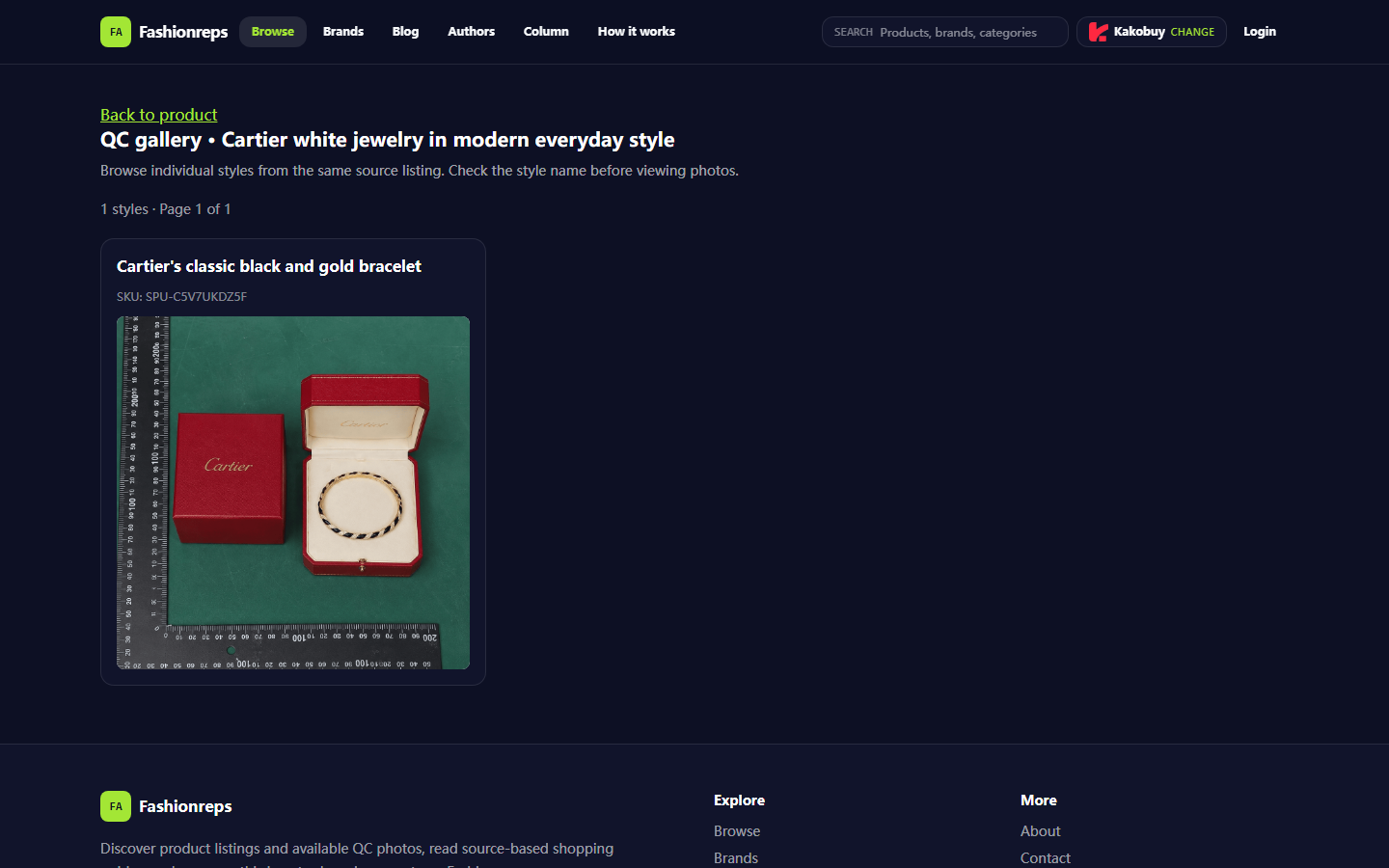
Caption: Example of a QC page related to Cartier on Fashionreps. The page information is used to identify the style and view available materials, and does not represent item authenticity, brand authorization, or actual purchase outcome.
Confirming Style, Specifications, Page Price, and Link Status from the Fashion-reps Product Page
Fashionreps is positioned to help users discover product pages, view source-based shopping materials, and compare third-party shopping agents. The page indicates that order, payment, and shipping are handled by the agent website chosen by the user. Therefore, product information on the Fashionreps page cannot be directly equated with the final price on the agent's checkout page.
The provided page materials show that a relevant QC page is titled "Cartier white jewelry in modern everyday style", and the page lists a style with the display name "Cartier's classic black and gold bracelet" and SKU: SPU-C5V7UKDZ5F. The name here is only the style identification information currently displayed on the page, and should not be interpreted as an official Cartier item, proof of authenticity, or brand authorization.
Before ordering, save the following information:
- Full name and SKU of the product page
- Currently selected style, color, size, or quantity
- Product price and currency displayed on the page
- Whether the product page opens normally and shows clear product name and information sufficient for purchase decision
- The shopping agent you actually land on after clicking Buy
If the page redirects, shows blank, has only tags without product materials, or the price does not match the style, stop the discount calculation first. When the item identity is unclear, even if the coupon face value looks high, you cannot determine whether it actually applies.
Recording the Current Coupon Entry, Claim Method, and Validity Period on the Target Site
Do not judge coupons based solely on search results, old screenshots, or third-party posts. You should check the following locations in the shopping agent website actually responsible for order and payment:
- Coupon or promotion page in the account center
- Available discount prompts on the product detail page or in the cart
- Coupon input box and selectable coupon list on the checkout page
- Condition descriptions on new user, event zone, or payment method pages
- Start time, end time, applicable site, and usage count in the coupon details
When recording coupon information, at least keep the coupon name, claim entry, validity period, minimum spend, applicable currency, applicable product range, exclusions, and whether login is required. If the page only shows "up to X off" or "limited-time offer" without clear calculation conditions, you cannot treat the maximum amount as the discount available for the current order. 🔎
This material does not provide an independently confirmable valid real-time coupon code, nor does it provide the current coupon rules on the agent's checkout page. Therefore, this article does not fill in specific codes, discount percentages, or estimated savings.
Checking Jewelry Category, Minimum Spend, Brand Exclusions, and Item Exclusions
For jewelry items, the common judgment order is to first look at the product category, then brand or store restrictions, and finally whether the specific item is excluded. The page shows Cartier-related names, but this alone is not sufficient to prove whether any coupon rule includes or excludes that item.
You can use the following checklist to fill in item by item:
| Check Item | What to Confirm | Action if Unconfirmed |
|---|---|---|
| Product Category | Whether jewelry, bracelet, or other classification falls within the coupon's applicable range | Do not treat vague descriptions other than "sitewide" as confirmed applicable |
| Minimum Spend | Whether calculated on item subtotal or discounted amount | Refer to coupon details or checkout page prompts |
| Brand or Store Exclusion | Whether specific brands, stores, source links, or event items are excluded | Pause when product name contains brand words and check exclusion list |
| Item Exclusion | Whether specific SKUs, special-priced items, QC items, or already discounted items do not participate | Recheck with current SKU and actual cart state |
| Currency and Region | Whether the discount is restricted by account region, destination country, or settlement currency | Do not infer availability for current order from other region screenshots |
| Usage Conditions | Whether new user, designated payment method, or specific event entry is required | Satisfy each condition before checkout and save results |
If the coupon rules only say "some items excluded" without a queryable exclusion list, mark the coupon as pending verification rather than assuming it works. Especially do not conclude that an item is definitely excluded just because the product title contains Cartier, nor conclude it definitely works because the page does not show exclusion prompts.
Verifying Whether the Discount Is Restricted by New User, Payment Method, or Order Status
Coupons may be bound to account identity or order status. Before submitting the order, check whether the account meets the following conditions:
- Must be a newly registered user
- Only for first order or first top-up
- Only usable at designated shopping agent or site
- Requires bank card, e-wallet, or other designated payment method
- Must be claimed from event page before returning to cart
- Limits usage count per account
- Requires order to be in unpaid status
- Mutually exclusive with other item discounts, shipping discounts, or balance deductions
If the coupon shows as claimable in the account center but not available in the cart, it may be that the item, minimum spend, currency, or account condition does not match. If the discount appears at checkout but then disappears after changing payment method or modifying quantity, the final order confirmation page prevails.
Do not repeatedly create orders, pay multiple times, or submit payment repeatedly just to try a coupon. Save the current cart state first, confirm the amount changes, then decide whether to continue. 💳
Breaking Down Item Price, Discount, Service Fee, and Shipping Fee in Cart and Checkout
The final amount payable should be broken down according to the order page's actual display, not just the product detail page price. It is recommended to record at least the following items:
Item subtotal + service or handling fee + domestic warehousing or operation fee + international shipping + other clearly listed fees − item discount − coupon discount = total amount payable displayed on the current page
Different agents may have different fee names and billing times. If the page only shows a total amount without explaining which item the discount applies to, expand the fee details first. For jewelry, where single-item value, packaging volume, and route requirements may differ, you cannot estimate final shipping based on item price alone.
After changing quantity, selecting a different agent, changing shipping route, or switching payment method, recheck:
- Whether item subtotal changes
- Whether coupon still exists
- Whether discount is deducted from item price
- Whether service fee changes due to order amount change
- Whether shipping is recalculated
- Whether exchange rate or payment page amount changes
If the discount amount shown is greater than the item subtotal, or the discounted total and details cannot be summed, stop submitting and keep screenshots or page records, waiting for platform explanation. 🧮
When There Is No Real-Time Coupon Code or Official Conditions, Keep Only the Verification Process
When there are no current official coupon rules, no readable coupon details, or no access to checkout page verification, you should not write "enter code X to get discount", "this item is definitely discounted", or "estimated savings of Y". These conclusions require order-level evidence.
You can adopt the following process:
- Open the target product page and confirm name, SKU, style, and visible price.
- Select the actual shopping agent and confirm item redirect and account status.
- Enter the coupon page and record currently claimable or usable coupons and their complete conditions.
- Add the item to cart and confirm whether the coupon is recognized by the system.
- Expand checkout details and separately record item price, discount, service fee, and shipping.
- Modify items that may affect applicability, such as quantity, payment method, or shipping route.
- Confirm the discount still exists and check the final amount payable.
- If rules, amounts, or item identity cannot be confirmed, stop payment and keep the current cart.
As of the verification date, what can be confirmed is that the page provides item identification and QC material entry; what cannot be confirmed is the real-time coupon code, coupon discount amount, brand exclusions, agent service fees, international shipping, or final order total.
Evidence Checklist and Stop Criteria Before Submitting a Cartier Order
Before submitting the order, at least keep the following records:
- Product name, SKU, style, and quantity
- Product page price, currency, and verification date
- Actual selected shopping agent
- Coupon name, source entry, and validity period
- Minimum spend and exclusion description
- Item subtotal, discount, service fee, shipping, and final amount payable
- Order status shown on checkout page
- Unconfirmed items and stop reasons
If any of the following occurs, it is not recommended to continue payment:
- Product page cannot confirm specific style or SKU
- Coupon validity period, applicable range, or exclusions are unclear
- Discount only appears in old screenshots or third-party posts
- Cart shows discount but checkout page does not retain it
- Checkout page amount cannot be obtained by summing details
- Amount or discount status abnormal after changing payment method
- Page requires using non-compliant methods to avoid taxes, inspection, or platform rules
- Requires public order, payment card, passport, or full waybill information to "claim discount"
There is no verifiable real-time coupon code this time, so no definite savings can be calculated. The value of continuing verification is to reduce risks of duplicate orders, payment discrepancies, or order cancellations caused by incorrect coupon use; the cost is the need to check coupon details and checkout breakdown additionally. It is suitable for buyers willing to keep evidence item by item before payment, not for those who want to place orders quickly based on promotional amounts, nor for orders where the agent and checkout page cannot be confirmed.