Fashionreps vs Google Sheets: Ami Paris Image Checks
Insight
Jonas ReinhardtDefine the Task of Cross-Checking Ami Paris Product Images, Colors, and Links When you see Ami Paris items on fashion-reps, the real question isn't "which spreadsheet is better," but confirming four things point to the same candidate: the style shown in images, the color listed on the page, the product title description, and the final product link behind the buy button. ✅ This article is for readers who have already found a candidate Ami Paris item
Jonas Reinhardt is Editor-in-Chief of the Kakobuy Yupoo Review Desk, writing agent comparison tables and leading retests. The work covers shopping-agent operations, parcel forwarding and QC photo standards, with Jonas signing off every hands-on score. Reviews are checked for order dates, QC photo notes, warehouse measurements and shipping-line timings, connecting the comparison tables with the records behind their scores. Each month, two reviews are selected at random and audited against original photographs and receipts, making publication approval and recurring checks of the supporting material part of the editorial work.
Define the Task of Cross-Checking Ami Paris Product Images, Colors, and Links
When you see Ami Paris items on fashion-reps, the real question isn't "which spreadsheet is better," but confirming four things point to the same candidate: the style shown in images, the color listed on the page, the product title description, and the final product link behind the buy button. ✅
This article is for readers who have already found a candidate Ami Paris item and want to build a reviewable checklist before ordering. After reading, you should be able to perform a two-way verification from page to spreadsheet and back, and mark which fields still need confirmation from the seller.
This article is not for authenticating genuineness, judging actual feel, or replacing the seller's flat measurements. The provided page data shows this striped knit crewneck sweater comes in three colors—red, green, and black—and four sizes S–XL; the page also notes a description discrepancy between the title and product attributes that needs further confirmation. The reference price shown is $28.05, and the final item price, service fees, and international shipping should be based on the checkout page of your chosen shopping agent. The verification baseline date is October 18, 2026, and the product info on the page was last updated September 26, 2026.
View fashionreps Website-Style Spreadsheet Catalog, Cards, and Visible Filters
Fashion-reps' website-style catalog is more like a browsing-oriented product index. You can enter the Ami Paris page from the brand entry, then narrow down via product cards, titles, categories, and on-site search. The product detail page handles more specific judgments, including product name, color, size, reference price, QC Photos entry, shopping agent selection, and the buy button on the page.
The advantage of this catalog is putting "discovering candidates" and "reading descriptions" in the same browsing path. You don't need to set up fields first; you can start viewing from images and titles, then enter the detail page. The page also provides a shopping agent selector; currently different agents can be chosen. The buy button will jump to the corresponding purchase path based on the selected agent. What can be confirmed here is that the page offers agent selection functionality, but it cannot be inferred that any particular agent is faster, cheaper, or has better after-sales service.
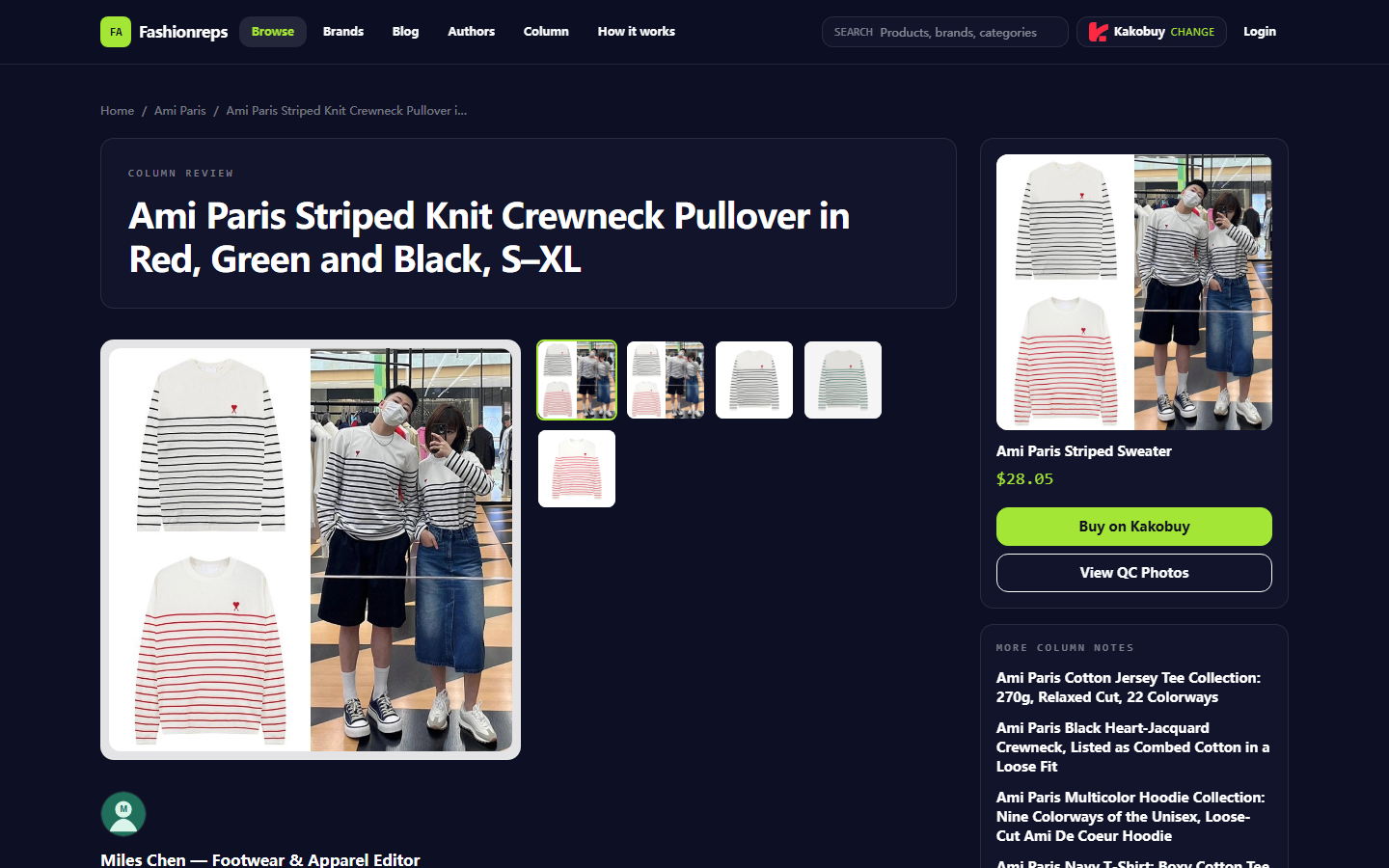
Images on the product page are suitable for answering "what visual object is displayed on the page." For example, the product image on the specified page is used to identify the stripe colorway and overall style, but the image alone cannot prove the actual shipped color, material composition, or fit. The page summary also distinguishes buyer reports as line-level info for this striped knit series, not independent purchase evidence for this specific link; this distinction should be kept in the spreadsheet. 🧶

Image: fashion-reps Ami Paris product page catalog, images, colors, sizes, and purchase path info. Images are only for page field verification and do not represent actual unboxing or QC evidence.
Record the following visible fields on the page first:
- Product title and page URL
- Style and identifiable colors shown in the main product image
- Colors, sizes, and material attributes listed on the page
- Reference price and price notes shown on the page
- Whether QC Photos is accessible, and whether it is displayed by style or by specific product
- Current shopping agent associated with the buy button
- Contradictions on the page or descriptions needing seller confirmation
Set Up Brand, Color, Image, and Link Columns in Google Sheets
Google Sheets is better for keeping multiple candidates in one sustainable, maintainable worksheet. Its value isn't replacing the product detail page, but turning scattered on-page info into records that can be filtered, sorted, supplemented, and collaboratively checked.
It's recommended to create at least the following columns:
| Field | What to Record | Verification Method |
|---|---|---|
| Brand | Ami Paris | Compare with page brand path and product title |
| Product Title | Full page title | Don't compress to the point of unidentifiable style |
| Color | Red, Green, Black, etc. as listed on page | Compare separately with image, product attributes, and seller options |
| Size | S, M, L, XL | Compare with page size range; note if flat measurements needed |
| Image URL | Page specified image or internal image identifier | Go back to original page to confirm image still corresponds to this candidate |
| Product Link | fashion-reps product detail page URL | Open and confirm it's not a tag page, dead page, or redirect |
| Agent Link Status | Not checked, accessible, login required, or pending confirmation | Don't equate button existence with purchase success |
| Issues | Inconsistencies among title, attributes, image, or color | Use short text to note next action |
Don't just write "multicolor" in the color column. If the page explicitly lists red, green, and black, record them as visible page options; if the same product card uses different color naming, keep the original wording too, and add a "standardized color" column for filtering. This makes filtering by color easy without losing the original page info. 🎨
The image column can store image URL, thumbnail, or internal image identifier, but don't treat the image itself as the product's only ID. Images may be replaced, cropped, or reused across pages, so the product link, title, and page recording time must still be kept together.
Demonstrate Differences Between Website Browsing and Spreadsheet Filtering for the Same Candidate
Suppose you want to check this Ami Paris striped knit crewneck sweater and keep only candidates where the page explicitly shows red, green, and black. Website browsing is good for first entering the Ami Paris category, opening the product card, and reading the detail page; Google Sheets is good for filtering rows where brand is Ami Paris, color includes the target color, and link status is accessible, after you already have multiple records.
The two methods serve different tasks:
- Website catalog is for discovering candidates and providing product context.
- Product detail page is for explaining title, images, attributes, price notes, and purchase entry.
- Google Sheets is for centralizing multiple candidates, filtering color and status, and assigning review tasks.
- Returning to the product page is for confirming the spreadsheet hasn't drifted from the original context.
Don't treat spreadsheet filter results as the latest product inventory. Whether the page is still accessible, colors are still selectable, and the shopping agent link still opens should all be rechecked when preparing to order. The spreadsheet is a verification record, not a stock or price promise. 📋
Verify That Image, Title, Color, and Product Link Point to the Same Object
You can follow this order for a complete verification:
- Open the product detail page and confirm it's not a pure tag page, empty page, or dead link.
- Copy the full page title to the spreadsheet; don't rewrite it into your own product name first.
- Record the colors and sizes explicitly listed on the page, and note colors you can directly observe in the image as a separate remark.
- Compare whether title, attributes, and image describe the same type of product. For example, if the page title says T-shirt collection, but the attributes describe wool composition, long sleeves, and crewneck knit sweater, this conflict cannot be resolved by you; mark it as needing seller confirmation.
- Check that the image is still in the content area of that product page, not from related recommendations or other styles.
- Click the buy button to confirm the currently selected agent and target path; only record link status, don't write "ordered" just because the button opens.
- Write the verification date, reviewer, and issues back to the spreadsheet for future rechecking.
For this Ami Paris item, the page data also indicates size and fit uncertainty: some line-level buyer info describes the striped knit as loose-fitting with long sleeves, while retailer size advice is inconsistent. Therefore, it's best to add a column "Need to confirm flat chest, length, sleeve length." Line-level info can help you ask questions, but cannot replace actual measurements for the item corresponding to this link.
If the image looks like red/green/black stripes but the color field only says "multicolor," don't arbitrarily split it into three purchasable colors; keep both the original page color field and your visual note. Only record it as a selectable color when the page explicitly provides that color option.
Mark Dead Links, Info Gaps, and Fields That Must Return to the Page for Confirmation
It's recommended to set unified values for link status, such as "Not checked," "Accessible," "Login required," "Redirect," "Dead," "Pending seller confirmation." This lets you directly filter out records needing attention and avoids mistaking a previously opened link for still valid today.
Pause organizing and return to the page in these cases:
- After opening the product link, it only shows category or tag content without a clear product name.
- Page image and title are clearly not the same style.
- Color field conflicts with image or selectable options.
- Page title, material, garment type, or size description contradict each other.
- Buy button requires login, or target path is unconfirmed after agent change.
- Reference price exists, but page doesn't explain service fees, international shipping, or taxes.
- QC images only represent the same style or reference source and cannot prove this order has been inspected.
For dead links, don't delete the original record. Keep the original link, dead date, and replacement page URL so you know why a candidate was removed from the current list. For missing colors, write "Page not specified" instead of guessing from the main image. For missing images, keep the product link and mark "Need to return to page to confirm image"; don't fill with an unrelated image.
Balanced Explanation of When Each Method Suits Quick Discovery vs Long-Term Organization
The website-style spreadsheet catalog is good for quick discovery: it strings together brand, product cards, detail pages, images, and purchase entries into a browsing path, making initial filtering more intuitive. Google Sheets is good for long-term organization: when candidates multiply and you need consistent color wording, assignment of reviewers, or tracking link status, a spreadsheet is easier to maintain.
| Use Case | Better for Website Catalog | Better for Google Sheets |
|---|---|---|
| First discovering Ami Paris candidates | Browse brand, cards, and detail pages | Not suitable for blind collection from an empty sheet |
| Comparing multiple colors and candidates | Open page by page and judge | Filter color, size, and link status |
| Checking image and title context | Product detail page | Save image URL and note issues |
| Multi-person collaborative review | Depends on page access and unified records | Assign reviewer, status, and date |
| Pre-order recheck | Confirm page and purchase entry | Summarize pending fields, not replace page recheck |
Therefore, the safest approach is not choosing one over the other, but using a loop of "website discovery, spreadsheet organization, page recheck." The website provides current visible evidence, the spreadsheet preserves the judgment process, and page recheck prevents records from becoming outdated. Neither can, on its own, prove authenticity, actual material, inventory, or final cost.
Final Action: Complete a Two-Way Verification Between Page and Spreadsheet
Now you can add this Ami Paris candidate to the spreadsheet and complete a two-way check: first copy title, color, size, image URL, and product link from the page, then filter the spreadsheet for Ami Paris, target color, and accessible links, and finally re-open each page row by row to confirm records still correspond to the same product.
Before submitting, at least confirm:
- The image corresponds to the current product page, not a related recommendation image.
- Contradictions between title and attributes are marked, not rewritten by you into definite facts.
- Colors like red, green, black come from explicit page fields; visual observation is not mixed with page options.
- The product link returns to a clear product page; status and verification date are recorded.
- The reference price is not mistakenly written as a final price including service fees, international shipping, and taxes.
- Size uncertainty has been turned into specific questions, such as requesting flat chest, length, and sleeve length.
- The buy button is only an entry to the purchase path, not yet representing ordering, payment, or shipping.
After completing this process, the website catalog still serves quick discovery, while Google Sheets becomes a filterable, collaborative, recheckable verification record. If you just want to find a product quickly, prioritize the page catalog; if you need to organize multiple colors, links, or multi-person review, use a spreadsheet; if page fields conflict, hold off ordering and return to the product page or confirm with the seller.
Article Image
