sp5der Hoodie QC: Check Graphics and Size Tags
Insight
Jonas ReinhardtFirst, Confirm Which Item Your QC Photos Belong To When buying this blue sp5der hoodie, don't immediately zoom in to look for flaws—first confirm the photos match the graphic, color, and size you intend to order. The product listing describes it as available in blue, black, and rose red, with sizes S–XL; the QC photo gallery lists 3 separate styles, including "Sp5der Trendy Blue Hoodie" with SKU SPU-LFABIE7SFU. Therefore, when entering the QC gallery, first
Jonas Reinhardt is Editor-in-Chief of the Kakobuy Yupoo Review Desk, writing agent comparison tables and leading retests. The work covers shopping-agent operations, parcel forwarding and QC photo standards, with Jonas signing off every hands-on score. Reviews are checked for order dates, QC photo notes, warehouse measurements and shipping-line timings, connecting the comparison tables with the records behind their scores. Each month, two reviews are selected at random and audited against original photographs and receipts, making publication approval and recurring checks of the supporting material part of the editorial work.
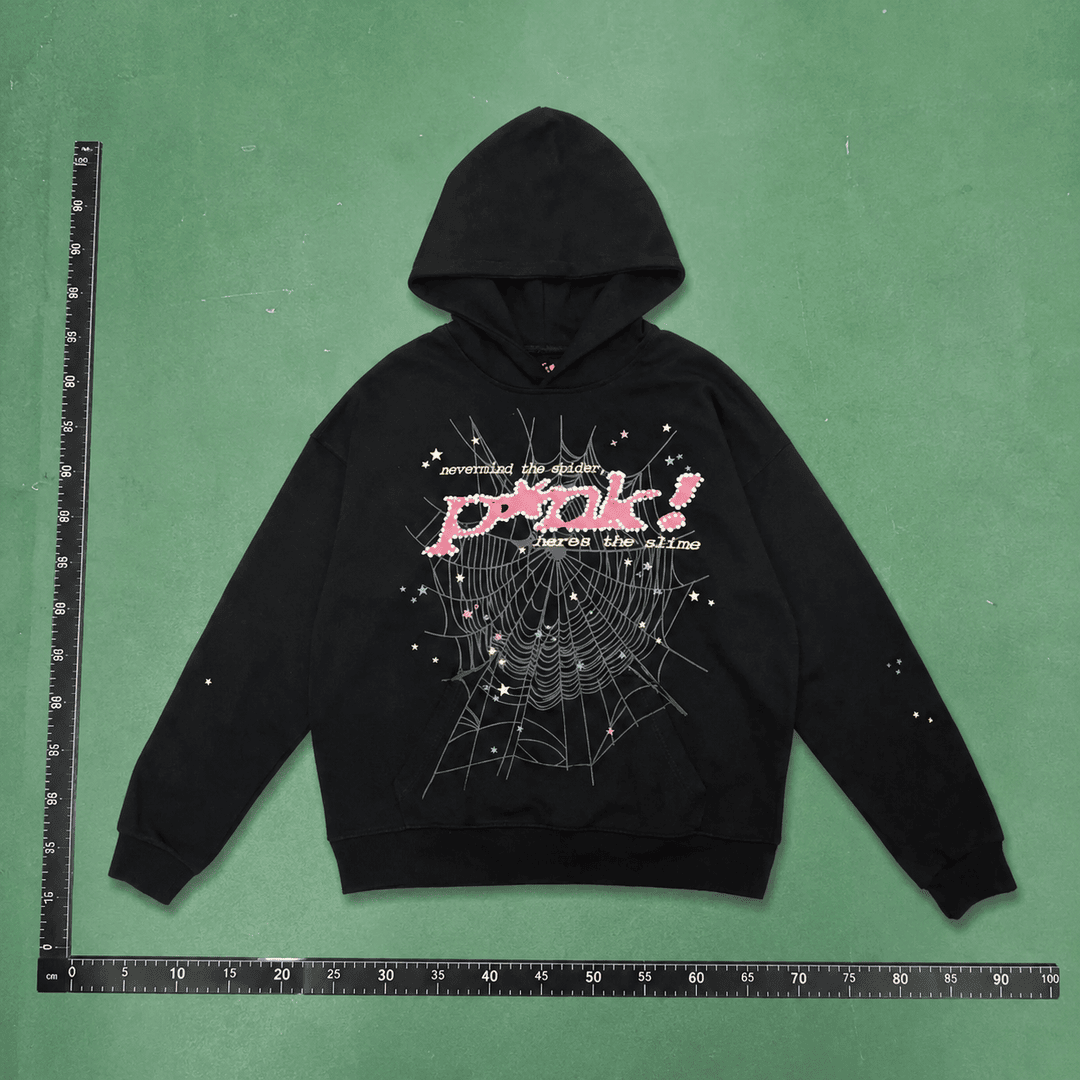
First, Confirm Which Item Your QC Photos Belong To
When buying this blue sp5der hoodie, don't immediately zoom in to look for flaws—first confirm the photos match the graphic, color, and size you intend to order. The product listing describes it as available in blue, black, and rose red, with sizes S–XL; the QC photo gallery lists 3 separate styles, including "Sp5der Trendy Blue Hoodie" with SKU SPU-LFABIE7SFU.
Therefore, when entering the QC gallery, first verify the style name and SKU shown on the page. If you selected the blue version but are viewing photos of the black or rose red version, any subsequent judgments about print placement, color, or details cannot be directly applied to your order.

Caption: This image illustrates the target product and QC verification topic and is for reference only; it does not replace the actual QC photos for your specific order.
Access the QC Gallery from the Product Detail Page
The correct path is to first open the product detail page for this blue sp5der hoodie, then click "View QC Photos" on the page. Do not guess the QC link based on file names, search results, or other product pages.
Once in the gallery, check the following in order:
- Does the style name match the graphic variant you selected?
- Does the SKU match the product detail page or your order record?
- Does the color match your order selection?
- Does the gallery clearly correspond to this product, not other sp5der styles from the same source?
- Do the photos cover the areas you care about, rather than only distant shots or unidentifiable angles?
The available page evidence only confirms that the source provides a QC gallery separated by style, and that it includes a blue entry; it does not allow confirmation from the product catalog alone that every detail in the photos applies to your specific size. Therefore, if the photo correspondence is unclear, ask the seller for clarification first.
What to Focus on in QC Photos
Graphic Variant and Print Placement
First check whether the chest or back graphic matches the selected style, then inspect whether the print edges show obvious breaks, missing ink, misalignment, or large areas of bleeding. The key is not to treat on-screen color differences as actual color discrepancies, but to judge whether the graphic composition, position, and outline match the product detail page.
The product information mentions that the print quality of related sp5der hoodies may vary by batch; the page's general inspection standards include whether the print is flat, whether the ink is even, and whether pocket stitching is naturally covered by the mesh pattern. These are reference points for incoming inspection, not authenticity judgments for this specific item, and cannot replace clear order QC photos.
Drawstrings, Hood Opening, and Shoulder Seams
Zoom in on the hood area to confirm whether both drawstring ends are visible and whether there is obvious loose stitching or severe fraying. Then check whether the hood opening edge is relatively even, and whether the connection between the hood and shoulder seams has any noticeable twisting, skipped stitches, or left-right differences.
If the QC photos only show a distant front view and cannot clearly show the drawstring ends, hood opening interior, or shoulder seam connections, do not write "no issues seen" as "no issues." A more accurate approach is to request close-up photos, especially of the drawstring exits, hood opening edges, and both shoulder seams.
Cuffs, Hem, and Stitching
Check whether the cuff ribbing is obviously loose, unraveling, or asymmetrical, and whether the hem is wavy or deformed. Along the shoulder seams, armholes, and pocket edges, observe whether the stitching is continuous, and whether there are long loose threads, obvious skipped stitches, or areas where stitching deviates from the edge.
QC photos only reflect the appearance visible at the time of shooting and cannot prove fabric strength, post-wash deformation, or long-term durability. The information describes this product as a relatively thin cotton hooded layer with a stated weight of approximately 300–350 g, suited for spring and autumn wear; this does not equate to an independent measurement of actual thickness or warmth upon receipt.
Size Tag and Size Verification
Confirm that the size tag is clearly visible and check that the marked size matches your selected S, M, L, or XL. If the size tag is not visible in the photos, or if it does not match your order selection, raise the question before payment or shipment.
The page information mentions that the product catalog allows a 1–3 cm measurement error, and brand-level size advice typically suggests choosing your standard size, with a size up for a looser fit. However, this is not a measured result for this specific item. The safest approach is to ask the seller to provide flat measurements of chest width, body length, shoulder width, and sleeve length for your chosen size, then compare them with your own garment measurements.
When to Request Additional Photos or Pause Your Order
Situations where you should first request additional photos rather than immediately paying include:
- The photos cannot confirm whether it's the blue version or another color version in the same gallery.
- The style name, SKU, or order selection does not match.
- The chest or back print is obstructed, making it impossible to determine the graphic variant and placement.
- There are no clear close-up photos of the drawstrings, hood opening, cuffs, or size tag.
- Key stitching areas are too dark, overly reflective, or low resolution.
- The seller cannot confirm whether the product is a pullover or another structure.
The existing product information has inconsistencies in structure description: the same catalog mentions both pullover and zipper structures, and both no pocket and patch pocket descriptions. This contradiction cannot be automatically resolved by general descriptions outside the QC photos. If you care about whether it's a pullover or has pockets, you should ask the seller to explicitly confirm the actual structure and provide photos of those parts in the QC images.
Final Judgment: Separate "Visible Facts" from "Purchase Decision"
After reviewing the QC photos, you can divide your conclusions into three layers:
- Visible facts: e.g., style name, color, size tag, print placement, and whether there is obvious loose thread in a certain area.
- Still needs confirmation: e.g., drawstring ends, interior stitching, flat measurements, or obscured print areas.
- Purchase decision: only consider proceeding with payment when the style matches, key details are visible, and the seller has addressed structural or sizing questions.
Do not write a QC photo as proof of authenticity, quality assurance, or personal measurement results. The source does not provide independent buyer feedback for this specific item, and the brand-level print discussion on the page cannot directly represent the current order. If the graphic variant, size tag, or key details cannot be confirmed, pausing your order is safer than guessing based on blurry photos.