Verify Palm Angels Accessory Coupons on fashionreps
Insight
Jonas ReinhardtClarify the Checkout Task When buying Palm Angels accessories, you can't rely solely on promotional text or reference prices on product pages to determine if a coupon is usable. What you really need to confirm is: whether the target item is within the coupon's scope, whether the cart meets the threshold, whether the brand or category is excluded, whether the discount can be stacked with other fees, and wheth
Jonas Reinhardt is Editor-in-Chief of the Kakobuy Yupoo Review Desk, writing agent comparison tables and leading retests. The work covers shopping-agent operations, parcel forwarding and QC photo standards, with Jonas signing off every hands-on score. Reviews are checked for order dates, QC photo notes, warehouse measurements and shipping-line timings, connecting the comparison tables with the records behind their scores. Each month, two reviews are selected at random and audited against original photographs and receipts, making publication approval and recurring checks of the supporting material part of the editorial work.
Clarify the Checkout Task
When buying Palm Angels accessories, you can't rely solely on promotional text or reference prices on product pages to determine if a coupon is usable. What you really need to confirm is: whether the target item is within the coupon's scope, whether the cart meets the threshold, whether the brand or category is excluded, whether the discount can be stacked with other fees, and whether the final amount due actually decreases at checkout. 🧾
This article is for buyers who plan to discover products on fashionreps and complete the purchase on their chosen shopping agent site. The fashionreps page itself is for displaying product information and purchase entry points; orders, payment, and international shipping are usually handled by the agent platform after redirect. If you haven't seen clear coupon rules, validity period, or checkout discount fields, you should not treat the coupon as confirmed.
Verify Style, Variants, and Page Status on the fashionreps Product Page
First open the target product page and note the following:
- Whether the product title clearly includes Palm Angels and the specific accessory name.
- Whether the product is a bag, hat, glasses, jewelry, or other accessory, rather than apparel.
- Whether selectable colors, sizes, quantities, and variants are still displayed.
- Whether the page loads normally, or if there are blank sections, errors, redirects, or only tags without product info.
- Whether the page shows the reference price or the actual checkout price from the agent platform.
- Which selected shopping agent the purchase button redirects to.
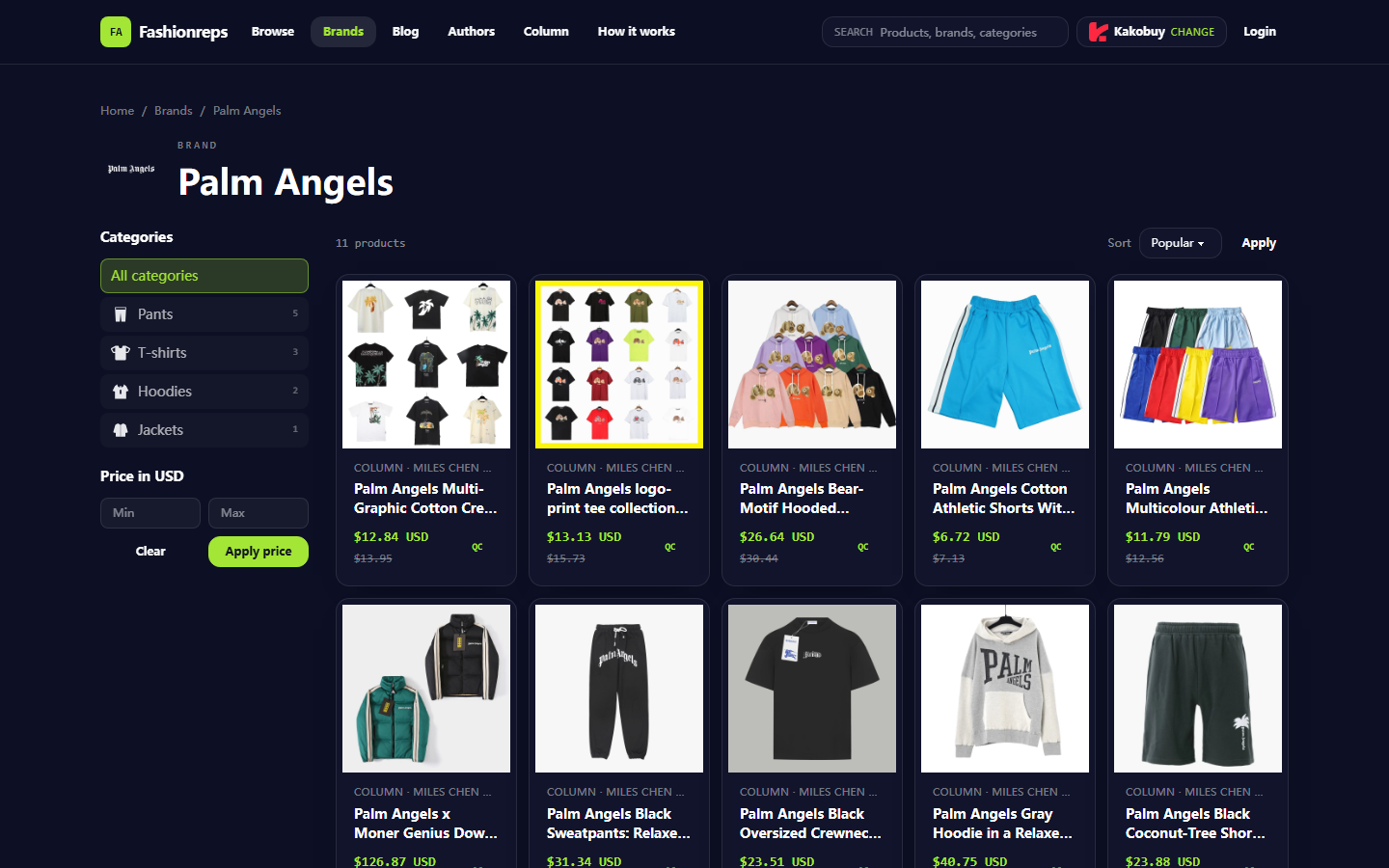
The currently available brand page snapshot shows 11 Palm Angels products, with categories like pants, T-shirts, hoodies, and jackets; the snapshot does not show a separate accessories category. Therefore, if your target is accessories, you cannot assume they are included in the sample just by the brand page name; continue to confirm whether the specific product page exists and displays sufficient style and variant information. The reference price on the page also cannot be taken as the post-discount transaction price.
Find the Currently Visible Coupon Entries and Applicable Instructions on the Target Site
Coupons may typically appear on the shopping agent's campaign page, account coupon center, cart page, checkout page, or in the coupon field before order confirmation. Prioritize checking entries that are actually usable in your currently logged-in account, and note:
- Coupon name or campaign name.
- Discount method: fixed amount, percentage discount, or shipping fee reduction.
- Applicable site, account, region, and payment currency.
- Whether it needs to be claimed, logged in, account-bound, or manually entered.
- Whether a specific logistics route must be selected when using it.
- The campaign's publish time, end time, and applicable time zone.
As of this writing, the provided materials only confirm fashionreps' product discovery page and shopping agent selection entry; there is no verifiable Palm Angels-specific coupon code, uniform discount rate, or official validity period. Therefore, don't treat old codes from the internet, coupons from other accounts, or campaigns not shown in your current account as usable discounts. 🔍
Check Minimum Threshold, Category Restrictions, Brand Exclusions, and Validity
After adding items to the cart, check the conditions in the coupon description item by item. The key isn't the coupon name, but whether the conditions cover your order.
| Check Item | Evidence Needed | Action If Unconfirmed |
|---|---|---|
| Minimum threshold | Whether calculated on merchandise amount or order total, and whether a specific currency amount is required | Budget based on pre-discount amount, no early deduction |
| Category restriction | Whether limited to apparel, shoes, accessories, or specific campaign categories | Confirm the target accessory's category matches the rules |
| Brand exclusion | Whether Palm Angels or other brands are excluded | Refer to the exclusion list in coupon terms |
| Validity period | Start/end dates, time zone, and whether limited to first order | Save the displayed period and query time |
| Account and region | Whether limited to new users, specific countries, or payment methods | Recheck with actual account and destination country |
If the page only shows vague descriptions like "sitewide" or "limited time offer" without threshold, exclusions, or period, treat it as a pending prompt, not a confirmed usable coupon. For items with rapid price changes, also recheck if the price changed after adding to cart.
Check If the Coupon Can Be Stacked with Service Fees, Packaging Fees, or Shipping
Product discounts usually don't mean a proportional reduction in order total. The checkout amount may also include agent service fees, storage or packaging fees, international shipping, insurance, and possible taxes or customs fees in the destination country.
When checking, record separately:
- Product subtotal, quantity, and variants.
- Amount eligible for threshold before discount.
- Discount amount.
- Service fees, handling fees, or other platform fees.
- Packaging, consolidation, or storage fees.
- International shipping, insurance, and optional value-added services.
- Taxes or tax notes shown on checkout page.
- Final amount due and payment currency.
Especially note that "free shipping," "shipping discount," and "order discount" are not the same thing. Some campaigns only apply to merchandise subtotal, some only to specific shipping lines, and some cannot be combined with other offers. If package weight, volume, or declared value changes after consolidation, the previously seen shipping estimate may become invalid. 📦
Distinguish Pre-Discount Amount, Discount Field, and Final Due on Checkout Page
Before checkout, it's recommended to make a simple record:
Product subtotal: ________
Pre-discount total: ________
Coupon name or campaign: ________
Discount applied: ________
Service and handling fees: ________
Packaging or consolidation fees: ________
International shipping and insurance: ________
Taxes or tax notes: ________
Final amount due: ________
Query time: ________
Account, destination country, and currency: ________
Only when the checkout page clearly shows the coupon applied and the final due has decreased as expected can you record it as "confirmed at checkout." If the coupon entry accepts the code but the amount doesn't change, check threshold, category, brand exclusions, account eligibility, and validity period; don't proceed to payment just because of "added" or "code valid" prompts.
Product reference price, cart estimate, and final payment amount are different measures. If they don't match, the pre-payment checkout page should be the basis for the current order, and keep necessary order summary or page records. Screenshots with personal information should mask names, addresses, phone numbers, order numbers, and payment info. 🔐
Record Query Time and Mark Confirmed vs. Pending Conditions
Coupon campaigns and product status change; when recording, at least note date, time, time zone, target country, currency, login status, and selected shopping agent. You can classify evidence levels as follows:
- Confirmed: Product page accessible; target accessory, variants, and price info visible.
- Confirmed: Coupon terms clearly state threshold, applicable categories, exclusions, and period.
- Confirmed: Checkout page shows discount applied; final due changes accordingly.
- Pending: Only banners, search results, or third-party descriptions; no usable entry in account.
- Pending: Coupon code can be submitted, but no actual discount appears.
- Pending: Shipping, taxes, consolidation fees not yet calculated.
Don't mistake one successful coupon claim as final savings. Only when product, fees, and checkout results are fully recorded can you calculate actual savings.
Decide Based on Evidence: Proceed to Checkout, Seek Clarification, or Hold Off
You can proceed to checkout if: the target product page is valid, accessory category and variants are clear, coupon rules cover the item, account is eligible, checkout page shows actual discount, and final amount and fee breakdown are acceptable.
Cases requiring clarification include: brand exclusion terms ambiguous, accessory category uncertain, unclear stacking with shipping, or checkout page shows coupon prompt but amount doesn't change. When consulting, provide only necessary product info and coupon name; don't send full order, passport, payment card, or complete waybill.
Cases to hold off: product page invalid, stock or variants unconfirmable, coupon expired, discount only exists in unverifiable third-party content, or final due still includes unexplained fees.
The final judgment should answer four questions: how much was actually saved, what new risks are added, what type of buyer should proceed, and when the coupon setup is not recommended. If the coupon only reduces a small portion of the product amount but requires choosing a more expensive or restrictive shipping method, savings could be offset by extra shipping. If you buy unneeded items to meet the threshold, don't count the nominal discount as real savings. ✅
Article Image
