Verify Puma Purchase Path: fashionreps vs Other Platforms
Insight
Jonas ReinhardtThis article addresses a specific question: after seeing Puma shoes on fashionreps, how do you determine whether the current product entry, product information, QC details, and subsequent purchase path are clear enough, and decide whether to continue comparing with other platforms using the same criteria? After reading, you should be able to complete a traceable product verification; if key information is missing, you
Jonas Reinhardt is Editor-in-Chief of the Kakobuy Yupoo Review Desk, writing agent comparison tables and leading retests. The work covers shopping-agent operations, parcel forwarding and QC photo standards, with Jonas signing off every hands-on score. Reviews are checked for order dates, QC photo notes, warehouse measurements and shipping-line timings, connecting the comparison tables with the records behind their scores. Each month, two reviews are selected at random and audited against original photographs and receipts, making publication approval and recurring checks of the supporting material part of the editorial work.
This article addresses a specific question: after seeing Puma shoes on fashionreps, how do you determine whether the current product entry, product information, QC details, and subsequent purchase path are clear enough, and decide whether to continue comparing with other platforms using the same criteria? After reading, you should be able to complete a traceable product verification; if key information is missing, you should pause the purchase rather than draw conclusions based on the platform name or a single image.
Verification date for this page: 2026-10-16. Prices, inventory, link status, agent policies, shipping costs, taxes, and after-sales conditions may change; before proceeding with an order, reopen the corresponding pages to confirm.

What This Puma Purchase Path Comparison Aims to Solve
The object of comparison here is not "which platform is absolutely better," but whether the same Puma shoes can establish a verifiable record across different entry points. At minimum, confirm four things: whether the product names match, whether specifications and sizes match, whether QC images or other product evidence correspond to the same link, and who handles payment, warehousing, shipping, and after-sales after ordering.
The fashionreps page clearly states that the site is for discovering products, viewing independent reviews and QC evidence, and directing users to external shopping agents; orders, payments, and shipping are handled by the agent's website. Therefore, product information on the page cannot automatically be equated with the inventory or service conditions the agent can ultimately provide. 🔎
How to Confirm Puma Product and Current Link from the fashionreps Catalog
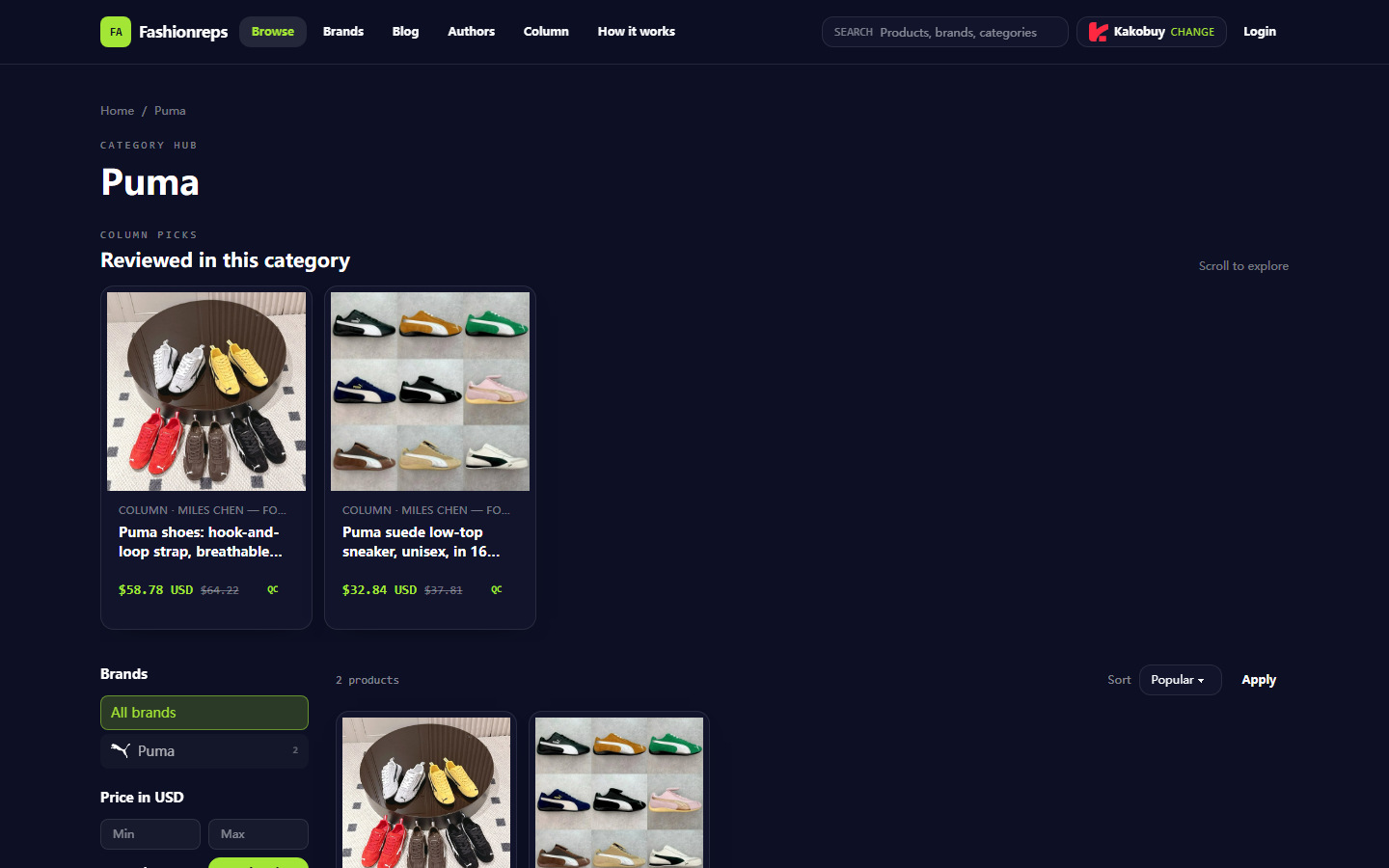
First, record the product name, product category, reference price, visible specifications, and page path, then record the verification time. The current Puma category page shows 2 products: one labeled as a Puma shoe with hook-and-loop straps and breathable construction, reference price $58.78, previous reference price $64.22; the other is labeled as a suede low-top unisex sneaker, available in 16 colorways and sizes 35–45, reference price $32.84, previous reference price $37.81.
These values can only be used as reference information displayed at the time of the page snapshot, and cannot be considered the final transaction price. The page does not provide complete inventory, shipping costs, taxes, agent service fees, or return/exchange outcomes in this record, so you cannot calculate the final landed cost or interpret "size description available" as current inventory availability.
When verifying, save the following fields:
- Page title and product description
- Product's category path
- Reference price and currency
- Visible specifications such as colorways, sizes, and materials
- Whether a QC entry exists and whether images correspond to the current product
- The shopping agent currently selected by the Buy button
- Whether the page opens normally and whether there are redirects, blank pages, or broken links
How to Establish a Uniform Record for Other Platforms' Product Entries and Information
Other platforms are suitable for comparison only when they provide reliable, verifiable product pages or pre-order information. The information provided here does not include any specific product links, snapshots, price records, or service terms from other platforms, so it is not possible to fill in prices, inventory, QC quality, shipping speed, or after-sales performance for any platform.
You can create a record using the table below, but blank fields must remain blank and cannot be filled with speculation:
| Verification item | fashionreps currently visible information | Information other platforms should supplement | Comparison judgment |
|---|---|---|---|
| Product identity | Puma category page shows 2 products with descriptions | Same product title, page URL, seller or product ID | Need to confirm if it is the same model, not match by brand name alone |
| Specifications | One product shows 16 colorways and sizes 35–45, the other shows hook-and-loop and breathable construction | Colorways, sizes, materials, sole or style details | If specifications differ, cannot be considered the same model |
| Price | Page shows reference prices of $58.78 and $32.84 | Product price, service fees, shipping, taxes, and exchange rate | Only compare in the same currency and same cost scope |
| Evidence | Page provides QC entry, but this record does not include specific QC image content | Product images, QC images, or verifiable descriptions from the other platform | When corresponding evidence is missing, mark as pending verification |
| Purchase responsibility | Orders, payments, and shipping are handled by external agents | Payment, warehousing, shipping, and after-sales terms of agent or platform | Need to separately assess discovery entry and transaction service |
If another platform can only provide similar images, search results, or short titles without product IDs, record it as a candidate page, not as evidence of the same model. 📌
How to Compare Product Specifications, QC Images, and Link Status Item by Item
The first step is to verify product identity. The same brand name does not mean the same shoe model; at minimum, compare style structure, closure method, upper material, colorways, and size range. The two Puma descriptions on the current page have clear differences and cannot be merged into one product simply because they are both Puma.
The second step is to verify specifications. If one page shows sizes 35–45 and another only shows partial sizes, record the specification range as different until complete information is obtained. If colorway names, material descriptions, or style details are inconsistent, you cannot use similar prices to prove the same model.
The third step is to verify QC images. QC images must be traceable to a specific product and order or product link. The presence of a QC entry on the category page only indicates that the page has a path to view QC evidence; it does not prove that the current product has complete, clear, or acceptable QC images. When no specific image content is available, mark as "not yet verified."
The fourth step is to verify link status. A page loading does not mean the product is purchasable or that the agent still has the same product. Before ordering, click the entry again to check for redirects, blank pages, or whether the same title and specifications are retained, and save the new verification time. ⚠️
What Must Be Verified Separately Regarding Orders, Support, and Fees
The fashionreps page provides a shopping agent selection feature and lists multiple optional agents. This selector only indicates that the site supports redirecting to the selected agent; it cannot be used to judge each agent's inventory, exchange rate, service fee, storage period, domestic shipping costs, international shipping costs, taxes, or after-sales policies.
Before actually ordering, confirm separately:
- Whether the product price is still consistent with the catalog page reference price
- Whether the agent accepts the current link and shows availability
- Whether the product requires pre-sale, restocking, or seller confirmation
- Whether QC images are provided after payment and whether return/exchange requests are supported
- Whether warehousing, consolidation, reinforcement, and dispatch incur additional fees
- Destination country's import restrictions, declaration requirements, and possible taxes
- Return/exchange time window for shoes, responsibility allocation, and return costs
- International logistics route, tracking method, and rules for handling abnormal packages
Any price comparison must unify currency and cost boundaries. If only comparing product list prices without agent service fees, domestic shipping, international shipping, and taxes, the conclusion can only be called a "catalog price comparison," not a final cost comparison.
How to Set Comparison Boundaries When Evidence from the Other Platform Is Missing
The information provided here is sufficient for buyers to verify the structure of the fashionreps Puma category page, the visible descriptions and reference prices of two products, but it is not sufficient to prove that other platforms have the same model, nor to determine which platform has better prices, QC, logistics, or after-sales service.
When evidence is insufficient, maintain three types of boundaries:
- Confirmed: The fashionreps page displays the Puma category, 2 products, corresponding descriptions, reference prices, and external agent selection entry.
- Pending confirmation: Whether specific product links are still valid, whether inventory exists, whether QC images are complete, and whether the agent accepts orders.
- Should not infer: Product authenticity, actual workmanship, final landed price, logistics speed, customs clearance results, and after-sales success rate.
This record-keeping method does not prevent comparison; instead, it avoids mistaking catalog page information for transaction commitments. If you cannot obtain the same model page and fee information from another platform, pause the "platform superiority" judgment and only continue verifying the link and specifications of a single product.
Checklist for Whether to Continue Comparing or Pause the Purchase
Situations suitable for continuing comparison:
- Both platforms can open specific product pages, and product titles, style structures, and specifications can be matched item by item
- Both sides can record verification dates, currencies, and price breakdowns
- The current link has no obvious redirects, blank pages, or invalidity warnings
- QC evidence can be linked to a specific product, not just generic promotional images
- The agent or platform can provide clear payment, warehousing, shipping, and after-sales terms
Situations where pausing the purchase is recommended:
- Can only match by the Puma brand name, cannot confirm the specific shoe model
- Only catalog reference prices, no product-level price or inventory confirmation
- QC entry exists, but no evidence corresponding to the current product can be seen
- Price comparison omits shipping, service fees, taxes, or exchange rate effects
- The agent cannot confirm link status, or after-sales responsibility is unclear
Next Steps After Verification
First, select a target Puma product and save the page name, description, reference price, specifications, and verification date. Then open the corresponding entry in a logged-in and authorized shopping agent, and re-check the product title, specifications, inventory, and fees. If planning to compare with other platforms, you must establish the same record for the other platform, not just copy a product image.
This verification does not yield a confirmed savings amount because data on prices, shipping, taxes, and service fees from other platforms is missing. Combined purchases may reduce repeated fixed operations or some shipping costs, but may also increase package value, volumetric weight, and single-loss risk; separate purchases may increase fixed costs but are easier to handle in terms of route restrictions or after-sales isolation. Only after obtaining actual fee samples can you calculate savings and added risks.
This verification method is suitable for buyers who need to confirm the purchase path for the same Puma shoes and avoid mistaking models; it is not a substitute for seller inventory confirmation, destination country tax consultation, or the agent's formal after-sales commitment. After completing all fields and retaining screenshots or page records, decide whether to continue ordering, switch platform comparison, or pause the purchase. ✅